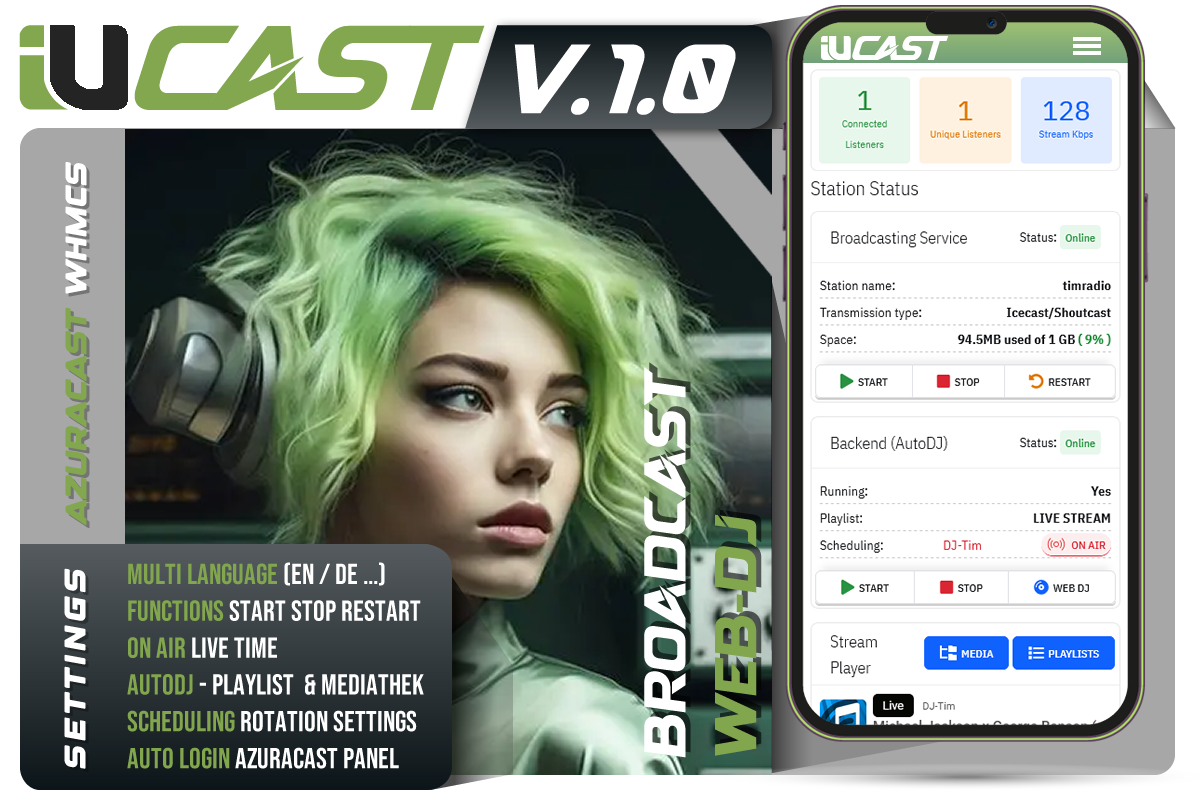
Anyone using AzuraCast for web radio and managing clients via WHMCS knows the problem: switching between both systems with as few clicks as possible, without losing the user experience. The AzuraCast WHMCS Addon connects AzuraCast and WHMCS so that station management, live information, and actions happen directly in the WHMCS client area – secure, fast, and without template adjustments.
>> MORE INFOS > IUNUS - DEVELOPER
Why "AzuraCast WHMCS"?
-
Direct control of Station and AutoDJ with one click
-
Stream Dashboard as a dedicated tab: Now Playing, Up Next, Listener Counts, Bitrate, and Player – all at a glance
-
Clean Security: CSRF tokens, Activity Logs, and API calls via secure methods
-
No core template changes thanks to Hooks – compatible with Six and common Lagom variants
Highlights for Clients (Client Area)
Stream Dashboard (Tab "#tabStreamDashboard")
-
On-Air Panel with current listener counts (current/unique) and stream bitrate
-
Now Playing: Title, Artist, and Cover Art
-
Up Next: The next scheduled track – compatible with various AzuraCast payloads
-
Integrated Player (embedding the public page or widgets)
Control Actions in the "Actions" Sidebar
-
Start Station, Stop Station, Restart Station
-
Start AutoDJ, Stop AutoDJ
-
Skip Song with confirmation modal and AJAX-POST (no redirect, no logout)
Additional Features
-
SSO Link to AzuraCast: Quick switch to the station's admin interface
-
Open Public Page: Direct access to the station's public page
Features for Administrators
Quick Setup in Server Module
-
AzuraCast Base URL (e.g., https://radio.example.com)
-
Admin API Key with sufficient permissions
-
Station ID for the target station
-
Optional: Public Page URL for NowPlaying polling
Secure Actions
-
All client actions are sent via POST with CSRF tokens
-
Activity Log in WHMCS records "Skip Song" & Co. with Service and User ID
Compatibility & Update-Friendly
-
Hooks-based: No adjustments to core templates needed
-
Works with "Six" and common Lagom variants; selectors easily adjustable
Under the Hood Technology
Hooks Integration
Hooks (ClientAreaSecondarySidebar, ClientAreaFooterOutput) add:
-
Sidebar link "Stream Dashboard" with
#tabStreamDashboard -
Dynamic tab and moving the AzuraCast panel into the new tab
API Calls
-
Now Playing (public):
GET /api/nowplaying/{stationSlug}for title, listeners, and bitrate -
Skip Song (Liquidsoap Backend):
POST /api/station/{stationId}/backend/skip
Robustness
-
"Up Next" is extracted from multiple fields:
playing_next,next_up,next,next_song -
Fallbacks for different AzuraCast versions and live DJ scenarios
Benefits in Everyday Use
-
Efficiency: Less switching between systems, faster customer support
-
Transparency: Real-time info directly where the customer expects it
-
Security: No unwanted logout, clean token processing, logging
-
Extensibility: Adaptable to themes; additional actions and panels easily added
FAQ
Does it work with your Whmcs theme?
Yes, the hooks dynamically add the sidebar link and tab. For heavily modified themes, selectors might need adjustment.
Do I need Liquidsoap?
Yes, for the "Skip Song" function, the Liquidsoap backend (AutoDJ) must be running.
Why is "Up Next" sometimes empty?
Depending on the AzuraCast version and stream status (Live DJ, empty playlist), the NowPlaying API may not provide a next title. The interface will then show a neutral message until data is available again.
Are actions logged?
Yes, in the WHMCS Activity Log: including Station ID, Service ID, and User ID.
Do I have to change WHMCS templates?
No. The integration is done entirely via hooks; core templates remain unchanged.
Call-to-Action
Connect AzuraCast and WHMCS with a consistent experience for your customers. Install the AzuraCast WHMCS Addon, activate the hooks, and offer professional stream management directly in the client area.
Contact & Support
Tell us your WHMCS version and your theme if you need help with adjustments (selectors, additional actions, extended dashboard info). We support you in achieving the optimal integration.